AI Room Design for Renters
Try AI room design for renters from your photo. Request ideas for rugs, lamps, and textiles while asking to keep walls, flooring, and furniture supplied with your rental.
Go to Rental Photo UploadReview your photo, preferences, and credits before generating.
What You Can Request—and What You Must Check
Ask to keep walls, flooring, fixed fixtures, and landlord furniture. Explore movable decor. The renter-friendly option guides the image request; it does not check your lease or guarantee that every detail stays unchanged. Check the image, your lease, and any permission or installation requirements before making changes.
Name What You Want to Keep
Ask to keep walls, flooring, fixed fixtures and landlord furniture. These are preferences, not locks on the result.
Explore Movable Decor
Request rugs, removable lamps and textiles. Check the result for additions outside your request.
Check Before Making Changes
Review the image, your lease, required permission, surfaces and installation requirements.
Renter-Friendly Room Makeover Ideas
Work Around Your Landlord’s Furniture
For a renter friendly room makeover, name the sofa or bed you want to retain and explore different textiles around it. AI may still change its appearance.
Explore Rugs, Lamps, and Textiles
Start with movable pieces you can evaluate yourself. Check your lease and any surface or installation requirements before making changes.
Consider a Budget Room Makeover
Explore lower-cost decorating directions by working around furniture you already own. Compare ideas before shopping; RoomRestyles doesn't provide product prices, cost estimates, or shopping lists.
Upload Your Rental Room Photo
Adjust the suggested settings before creating a design.
AI-generated sample photos for trying the tool.
Living room · Japandi
Furniture preference: keep existing pieces. Renter-friendly preference: on.
Review Credit Option and GenerateAvailable to eligible new accounts. Free results are watermarked 2K designs. Paid Standard 1K uses 1 paid credit; HD 1.5K uses 2 paid credits.
Rental Living Room: Before & After With RoomRestyles
AI-generated sample photo, restyled with RoomRestyles. Not a customer project; image details may change.
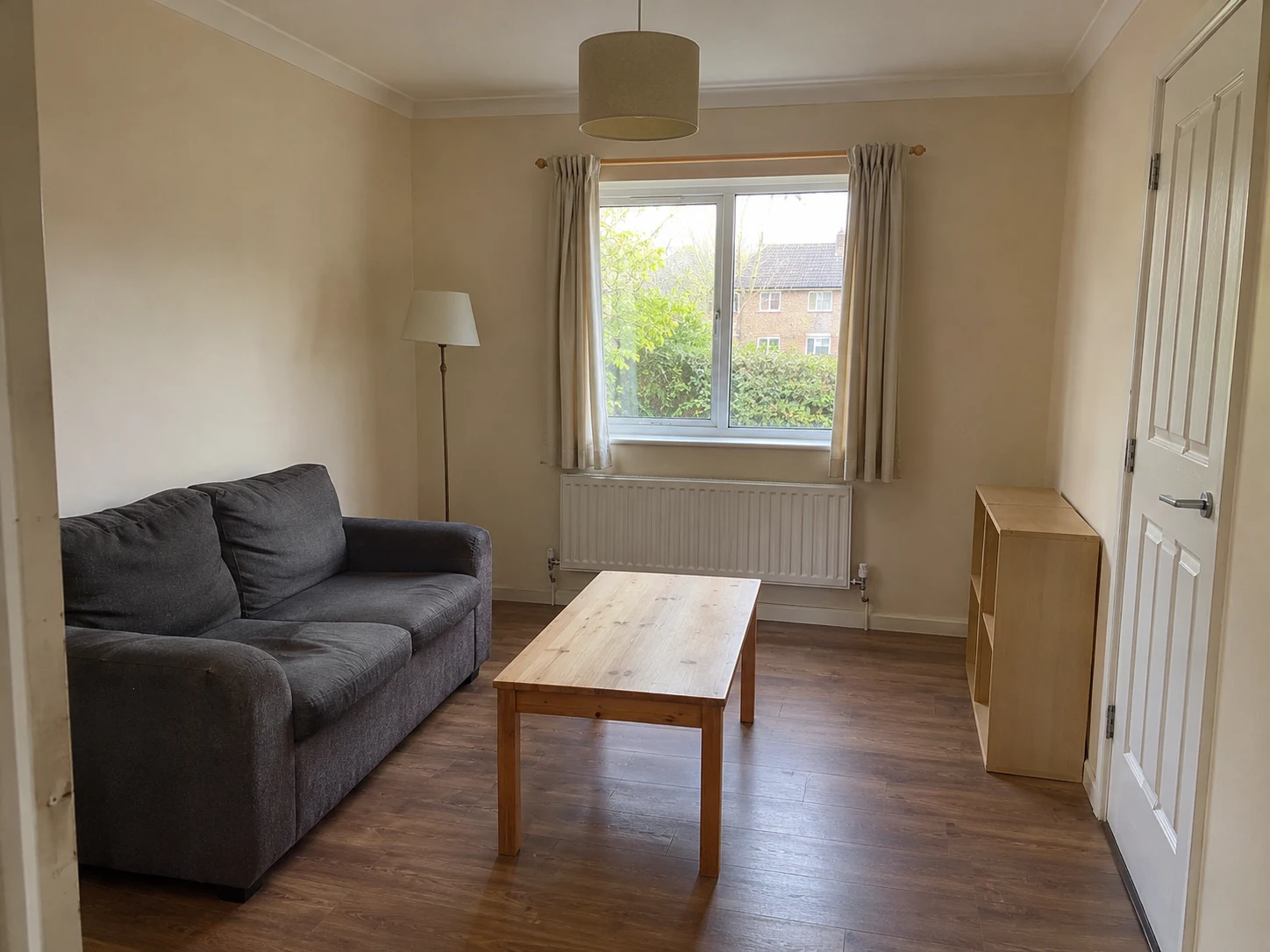
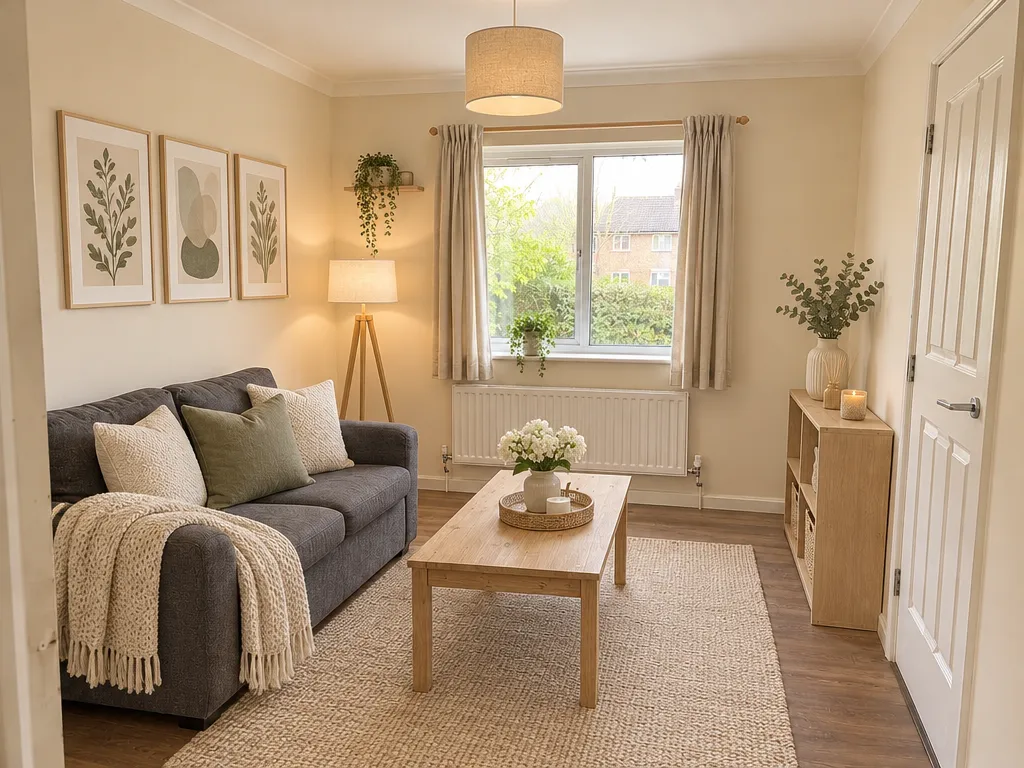
The sofa, radiator, window and door remain recognizable. The concept also adds wall art and a small shelf, and changes lighting details. Check these deviations and your lease before making changes.
Living room / Scandinavian. Furniture and renter-friendly preferences selected; the request asked for rugs, removable lamps and textiles without drilling or replacing fixed fixtures.
Wall art and a shelf go beyond the requested movable decor. Their installation method is unknown. Sofa, radiator and pendant details changed; the rug hides part of the floor. This result does not establish landlord permission or installation safety.
Try Your Own PhotoHow to Explore Ideas for a Rental
1. Start With an Authorized Room Photo
Use a room photo you have permission to upload. Exclude people, including mirror reflections, and personal details you do not want to share.
2. Name What You Want to Keep
Name fixed items and landlord furniture in your additional requirements. Review both preference switches; they guide the request and remain editable.
3. Review the Image and Your Rental Rules
Compare each requested item with your original photo. Check your lease, required permission, surfaces, and installation requirements before making changes.
Example of a Rental Design Request
Keep the beige walls, wood floor, radiator, and landlord’s sofa. Explore rugs, lamps, and textiles. Do not suggest drilling or replacing fixed fixtures.
Your Rental Photo and Privacy
Upload only photos you have permission to use, without people or mirror reflections. Remove personal details you do not want to share. Download the designs you want to keep.
Read the Privacy Policy for processing and retention details and the AI Usage Policy for image limitations.
Free Access and Paid Design Options
Eligible new accounts can receive 1 welcome credit with no expiration. Registration, verification, and eligibility conditions apply. Your sign-up confirmation shows the credit type and available balance.
Free designs include a watermark. Paid Standard designs (1024×768) use 1 paid credit; HD designs (1536×1152) use 2 paid credits. Free credits cannot be used for HD. Each new design uses credits.
Compare Plans and Credit PacksAI Room Design For Renters Questions
Will the renter-friendly option keep every wall and fixture unchanged?
It asks the AI to keep them, but details may change. Compare the result with your original photo.
Does the image mean my landlord permits the changes?
No. Check your lease and get any required permission before making changes.
Can I work around furniture supplied by my landlord?
Turn on Keep My Furniture and name the pieces you want to keep. AI may change visual details.
Can I enter a makeover budget or get a shopping list?
You can ask for lower-cost decorating ideas or request that existing furniture stays. RoomRestyles doesn't calculate costs, find products, or make shopping lists.
Can I upload a photo with someone in a mirror?
No. Use a room photo without people, including mirror reflections.
Can I try a free design?
Eligible new accounts can receive 1 welcome credit with no expiration. Registration, verification, and eligibility conditions apply. Your sign-up confirmation shows the credit type and available balance. Free designs include a watermark. Paid Standard designs (1024×768) use 1 paid credit; HD designs (1536×1152) use 2 paid credits. Free credits cannot be used for HD. Each new design uses credits.
Compare Plans and Credit PacksNeed Ideas for a Studio or Bedroom?
Explore a New Look for Your Rental
Start with a photo and the items you want to keep. Review the result before making real changes.
Go to Rental Photo UploadUpdated 2026-11-12